Back
Back
 7 min?>
Table of Contents
- What is detailed production scheduling?
- The main problems of Excel-based planning
- Benefits of automation: from intuition to algorithms
- What does a production planner work with: Gantt charts instead of spreadsheets
- The economic impact of implementing a DS system
- Which companies need detailed scheduling automation?
- How to prepare for implementation
- Conclusion: from “firefighting” to performance management
What is detailed production scheduling? ↑ Back to top
Planning is the foundation of any efficient manufacturing operation, with the primary objective of ensuring the timely and high-quality production of goods at minimal cost. To achieve this objective, companies use detailed (operational) production scheduling, which is designed to support daily and shift-level production tasks.
Detailed Scheduling (DS, APS, Scheduling) is the process of creating a shift-level production schedule, consisting of a sequence of operations allocated over time across work centers, typically presented in the convenient format of a Gantt chart. The schedule can be created either manually or automatically, with subsequent interactive modification of the operation sequence.
While high-level planning operates on the scale of weeks, months, or even years, DS goes down to shift level with minute-by-minute granularity, ultimately generating detailed shift and daily production assignments for each work center.
The main problems of Excel-based planning ↑ Back to top
Excel remains the most widely used tool for creating production schedules. However, behind its apparent simplicity lie significant systemic risks. A production scheduler must manually keep track of dozens of variables: operation sequencing rules, operation durations, setup times, raw material and tooling availability, maintenance schedules, actual execution of shift tasks, and unplanned downtime. The result of this hours-long process is the manual transfer of the completed schedule into the ERP or production management system.
What risks does manual planning in Excel involve?
- The cost of errors. A single typo—for example, accidentally entering one extra zero and getting 1,000,000 instead of 100,000—can make the entire production plan impossible to execute.
- The human factor. A planner is neither a machine nor an algorithm. They may overlook technological constraints, the availability of specialized tooling, or simply “lose” a production order during endless copying and pasting of cells in Excel.
- Significant time consumption. Creating a production schedule manually takes hours, and sometimes several working days, because the planner must simultaneously consider numerous factors affecting the sequence of production operations, such as warehouse inventory, shift schedules, personnel availability, raw material availability, and shipment deadlines.
- Lack of flexibility and the “domino effect”.Excel does not automatically recalculate the entire sequence of operations on a work center. If one production order changes its position in the schedule, the planner must manually move and recalculate all subsequent operations represented in the spreadsheet cells.
Benefits of automation: from intuition to algorithms ↑ Back to top
An automated scheduling system provides production planners with an intuitive interface and tools for quickly creating detailed production schedules. What does this deliver?
- Optimal capacity utilisation. The system arranges the sequence of operations to maximize equipment utilisation.
- Minimized setup times. The number and duration of changeovers between operations for one or multiple products are reduced, including consideration of intermediate or full equipment cleaning requirements.
- Constraint management. The system considers the availability of tooling and change parts, maintenance schedules (MRO), and technological downtime.
- Raw material availability control. If the required raw materials are unavailable on the planned date, the planner receives a warning, and the operation is automatically rescheduled to the day when the materials become available. If delivery dates change, the system automatically reorganizes the production sequence based on material availability.
Automatic scheduling is based on a set of configurable rules and heuristics that generate an optimized sequence of production orders in a short time according to predefined criteria. To modify the order sequence on a work center, the planner can use drag-and-drop functionality—manually moving an order along the timeline or assigning it to an alternative work center—after which the system automatically recalculates the entire sequence of operations. Once the planning process is complete, the results are transferred to the ERP or production management system with a single click by the planner.
What does a production planner work with: Gantt charts instead of spreadsheets ↑ Back to top
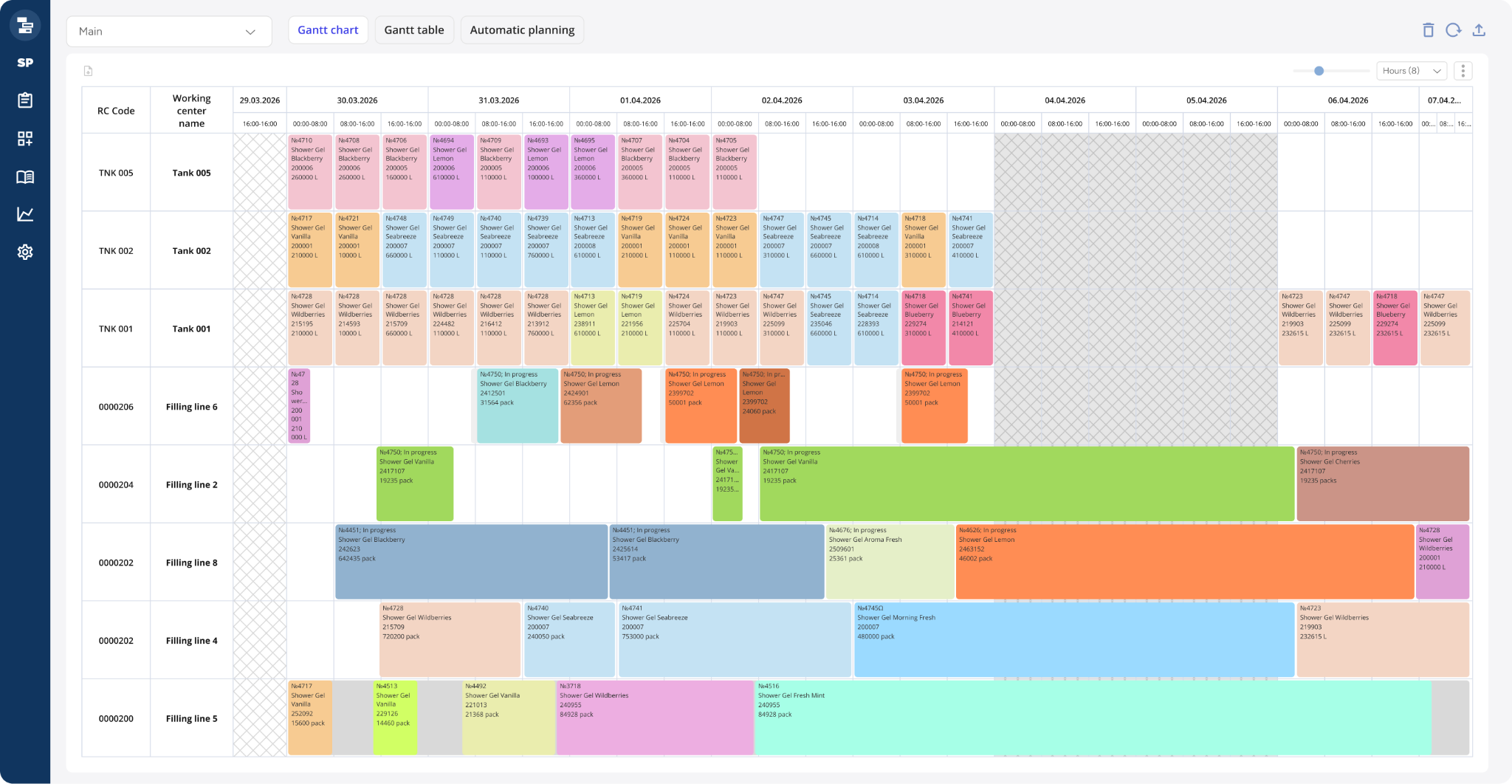
Unlike conventional Excel spreadsheets, the primary tool used by a production planner in a DS system is an interactive Gantt chart. Production operations and setup activities are displayed on work centers with customisable color coding, while non-working time and technological constraints are clearly visualized. The chart is fully interactive, allowing the planner to add, edit, or delete objects in real time.
The economic impact of implementing a DS system ↑ Back to top
Implementing a DS system is not only about improving convenience for production planners—it also makes a direct contribution to business profitability. Based on the results of completed implementation projects (for example, using im.systems solutions), the following key performance improvements can be highlighted:
- 5–15% increase in Overall Equipment Effectiveness (OEE). By applying minimisation heuristics, the system identifies hidden production capacity. Equipment that previously stood idle due to inefficient job sequencing or long-term cleaning procedures is now used to produce finished goods.
- 10–20% reduction in Work-in-Progress (WIP) inventory. A DS system synchronizes all stages of production. Semi-finished products no longer accumulate between workshops "just in case," because each subsequent stage knows exactly when the previous stage will be completed. This releases working capital for the company.
- Improved On-Time In-Full (OTIF) performance to 95–98%.Accurate scheduling enables the sales department and customers to receive reliable shipment dates. The system evaluates whether an order can realistically be completed on time, helping avoid penalties from retail chains and increasing customer satisfaction.
- 2–4 times reduction in planning time. Instead of spending 4–6 hours manually creating schedules in Excel, planners spend only 15–30 minutes generating the schedule and analyzing exceptions. This allows specialists to focus on solving production problems rather than performing routine administrative work.
- 15–20% reduction in finished goods inventory. More accurate and flexible production scheduling allows manufacturing to operate closer to actual demand. Companies no longer need to maintain excessive safety stock in warehouses to compensate for unreliable production plans—the schedule itself becomes dependable.
Which companies need detailed scheduling automation? ↑ Back to top
Manufacturers with complex, multi-stage production processes and highly variable production programs gain the greatest benefits from implementing an APS-class scheduling system. Several key indicators suggest that automation is no longer merely desirable but becomes a critical necessity.
Industry characteristics. The classic beneficiaries of DS are FMCG (Fast-Moving Consumer Goods) and the pharmaceutical industry. Why these industries in particular?
- Large number of SKUs. Product portfolios may contain hundreds or even thousands of items, each requiring its own sequence of operations and processing parameters.
- Multi-stage production and bottlenecks. Products pass sequentially through multiple workshops and work centers, while the capacities of individual production stages are typically unbalanced. A single machine or production line often becomes the bottleneck around which the entire production schedule must be organized.
- High frequency of changeovers. With a broad product portfolio, transitions between products occur continuously. In the pharmaceutical industry, this is further complicated by strict requirements for intermediate and full equipment cleaning, which can take several hours. Optimizing the production sequence in such environments delivers substantial cost savings.
- Volatile demand and supply lead times. Market conditions constantly shift, changing production priorities, while raw material deliveries may be delayed. Under these circumstances, a static production plan created at the beginning of the week may already be obsolete by the middle of the week.
When Excel is no longer enough. In addition to industry-specific characteristics, there are several universal indicators that signal the need to transition to a DS system, regardless of the type of manufacturing operation:
- The production planner is the only holder of critical knowledge. All scheduling rules, constraints, and sequencing logic exist only in the planner’s head. Their absence due to vacation or sick leave can cause a production breakdown.
- Chronic delays and constant firefighting. Shipment deadlines are regularly missed despite production capacity appearing to be fully utilized. At the end of every shift or month, emergency efforts become inevitable to complete urgent orders.
- Unexplained downtime. Equipment periodically stops, but there is no systematic understanding of the reasons—whether the downtime is caused by scheduled changeovers, raw material shortages, or organisational delays.
- A disconnect between planning and execution. The production schedule exists in Excel, while actual execution is recorded in the ERP system. Reconciling these two versions of reality consumes hours of working time and creates conflicts between departments.
If a company recognizes itself in even two or three of these situations, it is a clear indication that manual planning methods have become an obstacle to growth, and the time has come to transition to a specialized DS solution.
How to Prepare for Implementation ↑ Back to top
The success of a detailed scheduling automation project is largely determined during the preparation stage. Experience shows that attempting to "simply deploy the system" without prior methodological work often leads to disappointment and a return to Excel. The following areas deserve particular attention:
1. Up-to-Date Master Data. This is the foundation without which scheduling algorithms cannot generate a reliable production plan. In particular, the following information must be accurate and complete:
- Equipment inventory and characteristics. A complete register of work centers, including their capacities (processing rates), equipment types, and available production calendars.
- Bills of Materials (BOM) and Routings. A complete description of the sequence of operations for each product, including standard processing times and transition rules between production stages.
- Setup standards. The duration of changeovers between different product groups and equipment cleaning requirements. If these standards do not exist, they must be established during the assessment phase; otherwise, schedule optimisation will not function effectively.
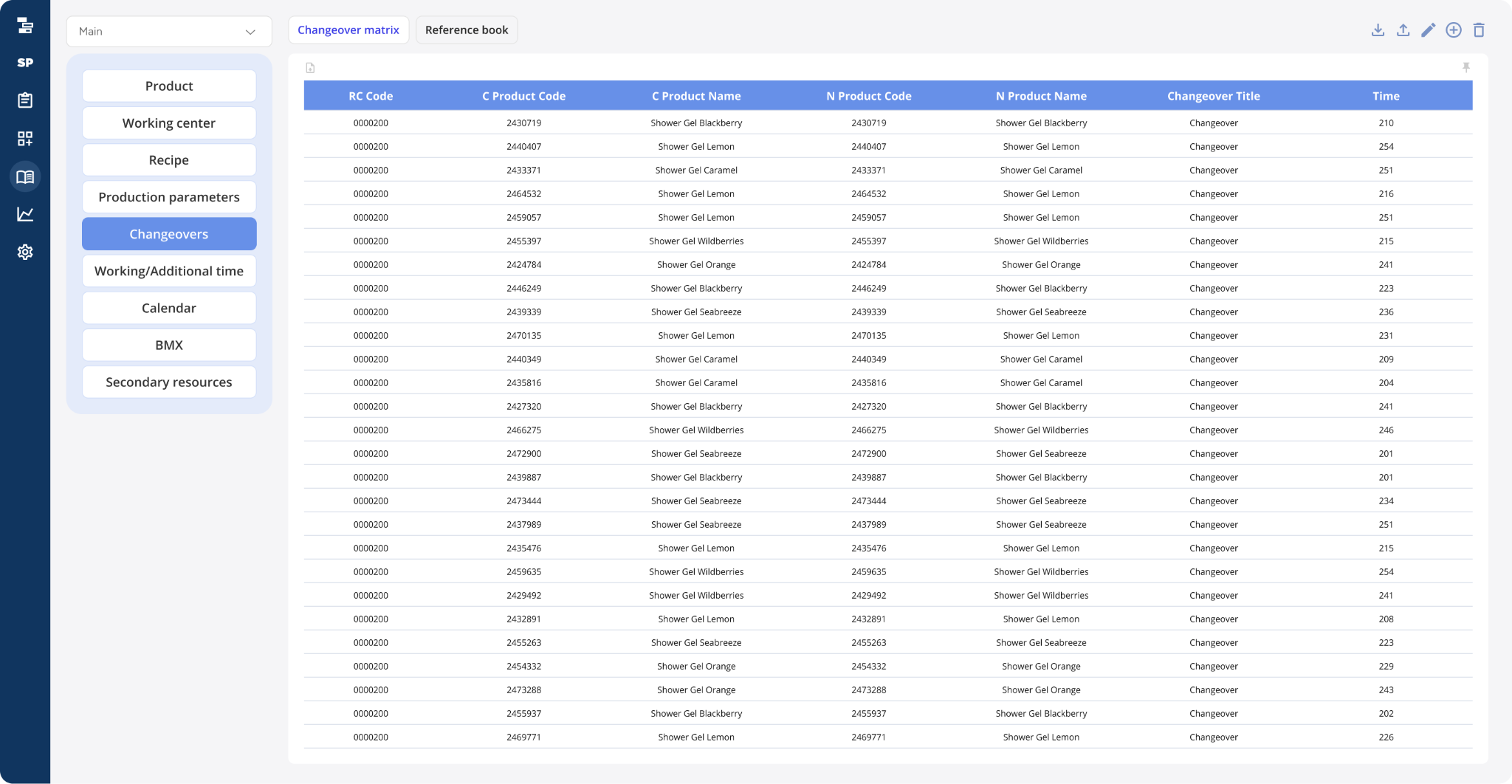
Example of a Master Data Directory (Setup Matrix) from Knowledge Space Scheduling
2. Formalizing Rules and Constraints. This is the most important stage, as it directly determines the quality of the future production schedule. The following elements must be identified and documented:
- Technological constraints. Restrictions such as the inability to manufacture certain products simultaneously on adjacent production lines due to cross-contamination risks, temperature requirements, sterilisation times, and similar process limitations.
- Resource constraints. Availability of specialized tooling and change parts, preventive maintenance schedules (MRO), and personnel qualifications required to perform specific operations.
- Business priorities. Which production orders should take precedence, and according to what criteria should the system schedule them: shipment date, product profitability, customer priority, or another business rule? The answers to these questions must be translated into configurable scheduling rules within the algorithm.
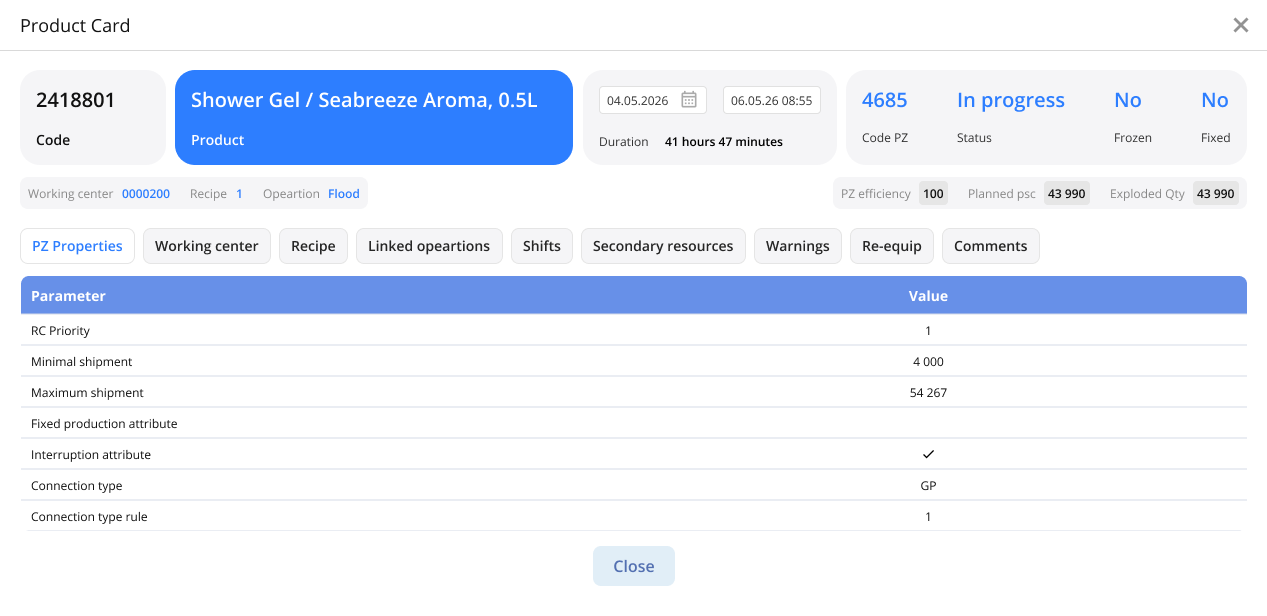
Example of a Production Order Card from Knowledge Space Scheduling
3. Personnel adaptation. Any new system changes established ways of working. To prevent resistance from undermining the project, it is important to:
- Involve key production planners during system configuration. The people who will work with the system every day should understand its decision-making logic and have the opportunity to influence scheduling rules, rather than receiving a ready-made "black box".
- Implement the system gradually. The most effective approach is to operate the new system in parallel with the existing planning method for a period of time. Schedules are generated in the DS system, compared with manually created plans, and only after confidence in the results has been established does the new system become the primary planning tool.
- Provide training using real production scenarios. Rather than relying on abstract training sessions, use actual production cases from the enterprise so that planners can immediately see how the system helps solve their day-to-day challenges.
Thorough preparation in these three areas transforms a DS implementation from a purely technological project into a practical tool for improving operational efficiency—one that the production team will actively use.
Conclusion: From “Firefighting” to Performance Management ↑ Back to top
Detailed Production Scheduling (DS) is much more than replacing Excel spreadsheets with an attractive interface. It represents a fundamental shift from reactive planning to proactive operational management.
As long as a company continues to plan production manually, it incurs hidden losses every hour—through unnecessary changeovers, downtime caused by delayed raw materials, and human error. In today's market, where supply chains are increasingly unstable and customer expectations for service levels continue to rise, manual planning is no longer sufficient.
In summary, implementing DS allows companies to:
- Free production planners from routine work, transforming them into analysts who evaluate and select the best scheduling scenarios generated by the system.
- Make production transparent, allowing everyone—from plant managers to shift supervisors—to work from the same up-to-date and achievable production schedule.
- Increase profitability by minimizing downtime and consistently meeting shipment deadlines.
If your manufacturing operation has outgrown the capabilities of Excel, and your production planner spends 80% of their time constantly redrawing schedules, it is a clear indication that the time has come to implement a DS solution. Automating detailed production scheduling is the "last mile" that transforms a company's strategic plans into actual finished products in the warehouse.
Authors:
Nikolay Mamonov, Product Director, Knowledge Space
Renata Lukonina, Product Owner, Production Scheduling, Knowledge Space